Honda · Increasing Lead Conversion on Vehicle Listings Page
TEAM
1 Designer, 1 Product Manager, 2 Developers, 3 Stakeholders
IMPACT
Monthly website leads increased by 5.2%
DELIVERABLES
Banner placement logic, Prototypes, UI designs, Design specs for dev handoff
DATE
Jan - Feb 2025
OVERVIEW
Acura is Honda’s luxury car division, the website receives 3M+ visits per month.
Despite steady traffic, website leads were declining. The problem was not demand, but discoverability.
Data showed that only 38% of users moved from Listings page to Details Page, and most never reached a point where they could express intent.
The issue was on the Vehicle Listings page. Users could not easily find key actions (like Book a Test Drive / Request a Callback). These actions were only available on the Vehicle Details Page.
We decided to bring key actions directly onto the Listings page to capture user intent earlier.
After introducing targeted lead-generation banners on the Listings page, overall monthly website lead conversions increased by 5.2% (without any major rise in traffic).
Reading time: 5-7 mins
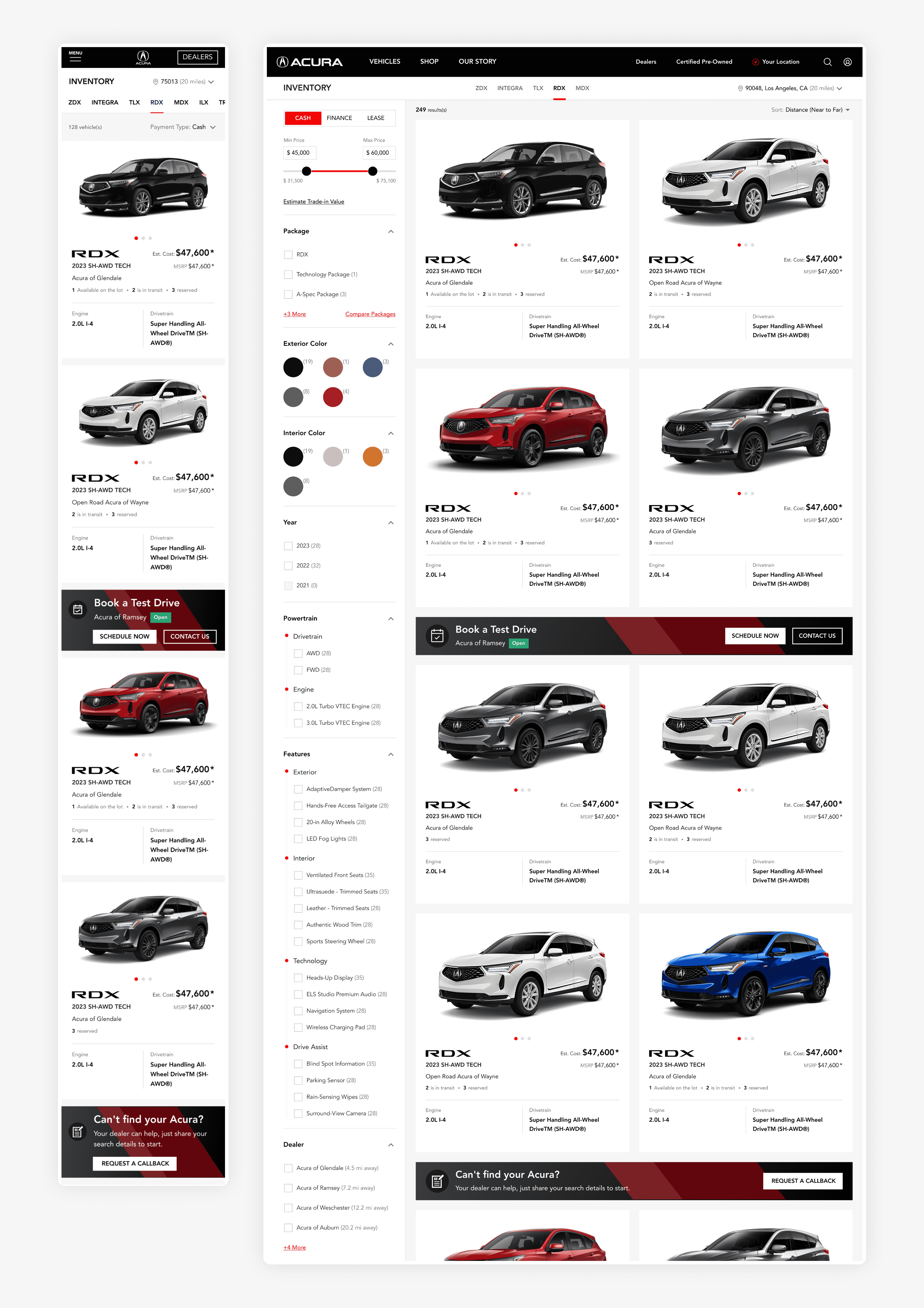
The goal was to make key actions (using banners) more visible and accessible earlier in the journey.
Problems in the Acura Website
The data showed a clear drop in website leads. We had couple of meetings with stakeholders from Acura to understand what was happening in the platform.
Website traffic remained stable. No major releases, outages, or funnel changes in recent months. At a surface level, the end-to-end journey looked intact. Yet, the numbers told a different story.
How leads were generated, existing website funnel
To understand where this disconnect was happening, we mapped the full user journey to understand the funnel.
At a high level, the Acura website follows a familiar ecommerce pattern. Users browse inventory, evaluate options, and move forward when ready. The difference is that car buying is a high value, high involvement decision, so intent builds gradually.
If the user is interested in buying this vehicle, they can click the “Buy Online” CTA in the Details Page and submit their info, which creates a lead.
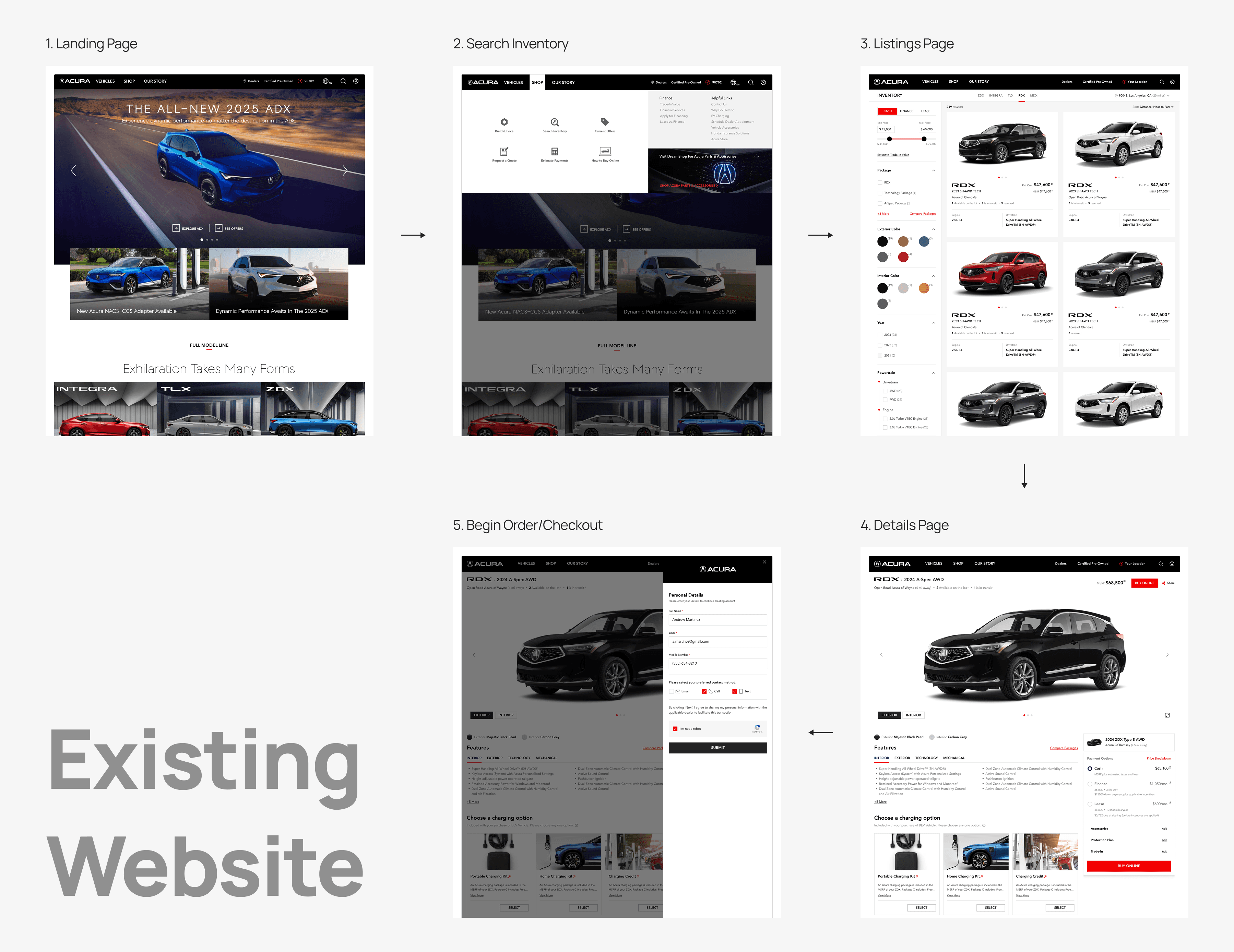
There wasn’t any clear pattern pointing to the problem of low website leads....
We mapped the entire journey and honestly we couldn’t find anything that was breaking. The flow looked pretty seamless. And this is where we thought we should definitely look at the Website Analytics & try to understand where the funnel was failing.
Only 38% of users continued from listings to details page
Details page is the only place (in the entire funnel) where user can connect to a dealership / submit their contact details (a lead).
A high % of users didn’t reach the Details page where the lead generation CTAs were present.
Given the high drop off at the Listings page, we believed this was the primary reason why overall website leads were declining. Apart from this, we didn’t find any other alarming patterns in the data.
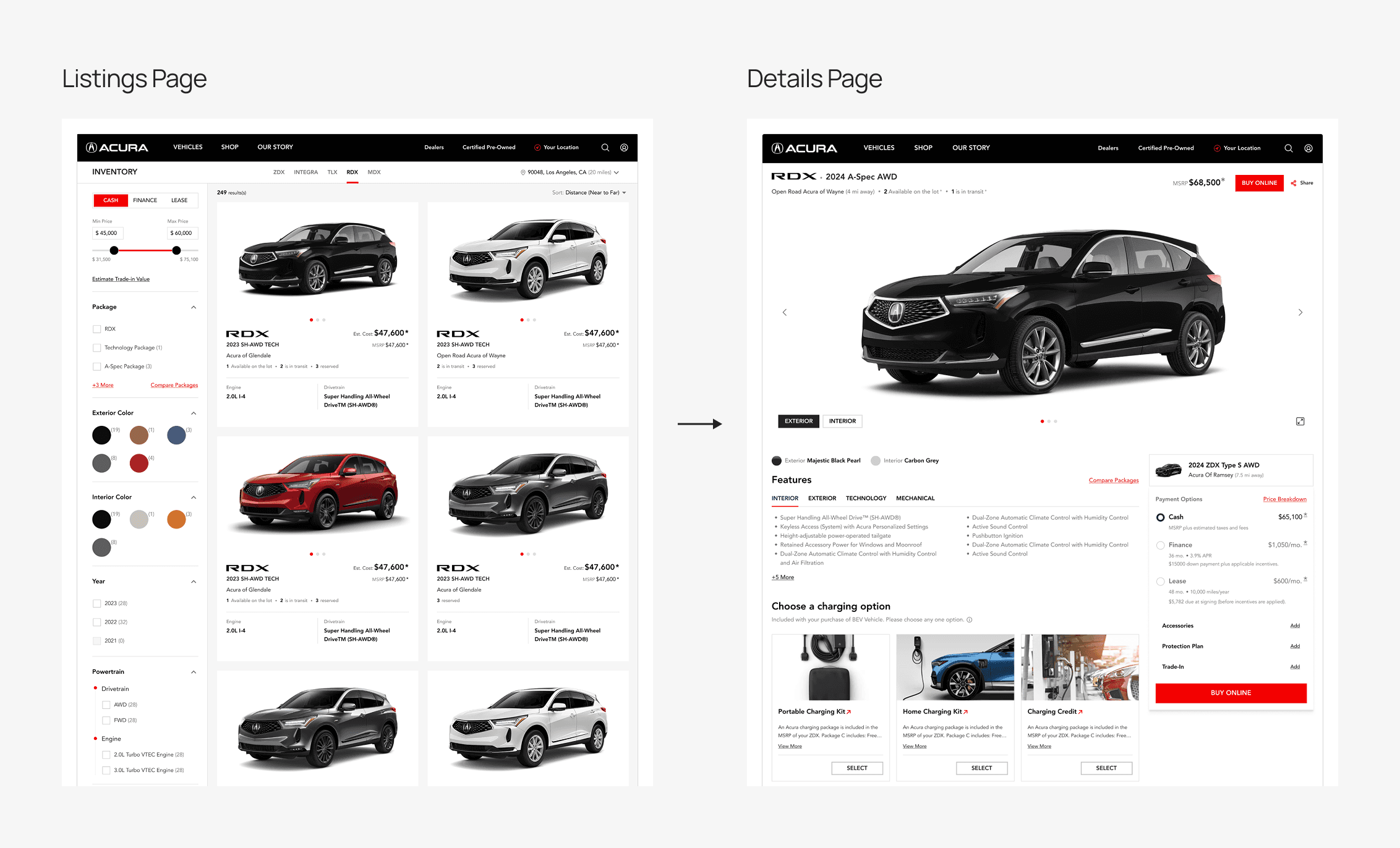
Only 38% of users continued from listings to details page
Watching User Recordings
To validate our hypothesis, we started reviewing session recordings on the Acura website. Here’s what we specifically found on the Listings page:
Users hesitated on the Listing page
Lot of visitors scrolled through the inventory but rarely clicked on individual VSR cards. They spent time interacting with filters, comparing prices and trims visually, then exited without interacting further.
Users paused briefly often hovering on individual cards but not clicking them
It was like they were waiting for something to happen (maybe an action).
User session recording
What we learned from talking to users?
I think we were on the right direction but to make the hypothesis bulletproof, we decided to directly talk to the users about this problem. We conducted focused user sessions with existing and prospective Acura customers across different stages of the car-buying journey.
While there were multiple insights, if we look specifically at insights around the listings page, this is what we heard:
Not everyone is ready to dive deep
Many users, especially first-time buyers, visit the website just to explore price ranges or color options. They’re curious but not yet committed.
Some users prefer human reassurance when buying cars
Some users said they’d rather talk to a dealership first before exploring detailed specs online. These were often mid-age buyers or those transitioning from offline dealership experiences. Also, some of the users said they prefer simple, low-effort actions at the first step itself instead of going inside the funnel or filling long forms.
Understanding user behavior in automotive retail
Car buying is multi-stage. Users oscillate between curiosity, comparison, and decision.
Not everyone is ready for a details page
Digital-first users wanted efficiency: simple, low-effort actions at the first step
Key takeaway: There were no key actions present in the listings page which led to high drop offs & eventually low website leads.
The Solution
After going through all the research findings and user insights, we presented them to the internal team and finalized an initial direction to solve the problem.
We realized that the friction wasn’t in intent but in visibility.
By making lead actions visible earlier (on the Listings page), we will capture these “warm” leads who would otherwise vanish from the funnel.
Deciding what needs to be shown
Before jumping into design, we aligned internally on what information the action should communicate. The goal was to keep them purposeful and not clutter the browsing experience.
We started by listing all possible actions and data points we could show:
promotions
finance offers
trade-in options
book a test drives
request a callback
After reviewing research insights, we narrowed it down to two key lead generating actions:
Book a Test Drive: targeting users who are ready to experience the car.
Request a Callback: helping users who prefer direct interaction with a dealer before deciding.
It was also a strategic business move, since more leads ultimately meant more sales/revenue for Honda.
Early Experiments and Iterations
Once we had this clarity, we moved into creating some early concepts for how we want to show this information.
Concept 1: Filler Cards
The first approach we took was to replace a few VSR cards with Filler Cards (that highlighted key actions).
Pros:
Breaks Grid Pattern and Increased Visibility
From a UX standpoint, Filler cards break the visual rhythm of identical vehicle listings, creating a moment of pause that naturally draws attention to key actions or information.
Mobile-Friendly
On mobile devices, the filler cards adapt naturally to the existing VSR grid structure. No separate component or layout is needed, making it responsive by default and consistent across breakpoints.
This design simplified the layout and immediately improved key actions visibility, but came with its own trade-offs.
Cons:
Interrupts Vehicle Browsing
Users who are primarily interested in vehicles might find this approach a little bit disruptive, as it shifts their focus away from what they came for (VSR cards) to Filler cards.
Banner Blindness
Users who are purely vehicle browising may develop "banner blindness" over time, especially if they feel these filler cards intrude on their browsing experience.
Too much real estate
Each filler card occupied the same real estate as a vehicle card, which reduced the number of vehicles visible at a time. While it was important to show key actions, doing so at the cost of a vehicle card was a big no from the stakeholders.
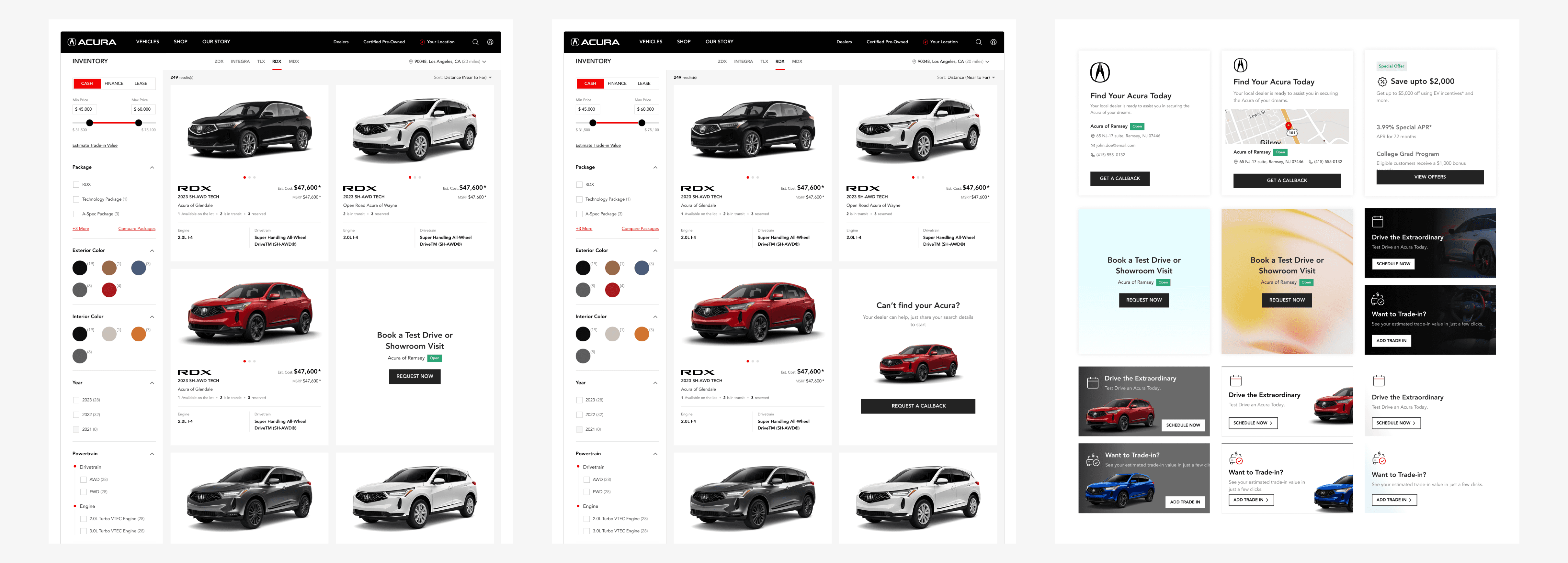
Concept 1: Filler Cards
Concept 2: Inline Banners
Now because of these cons, there was one more approach that we tried.
Having full fledged inline banners with CTAs inside them.
Pros:
Efficient Use of Space
The inline banner takes up less space, allowing users to continue browsing vehicles without major interruptions.
Maintains Existing Browsing Flow
Users can access key actions naturally as they scroll, reducing friction in the browsing experience compared to filler cards that occupy full grid space.
Cons:
Visual Overlap Risk
These banners might blend too much with surrounding content (VSR cards), reducing their discoverability.
Visual Noise
Although its less than filler cards, frequent appearance of inline banners might still create light cognitive interruptions for users scanning purely for vehicles.
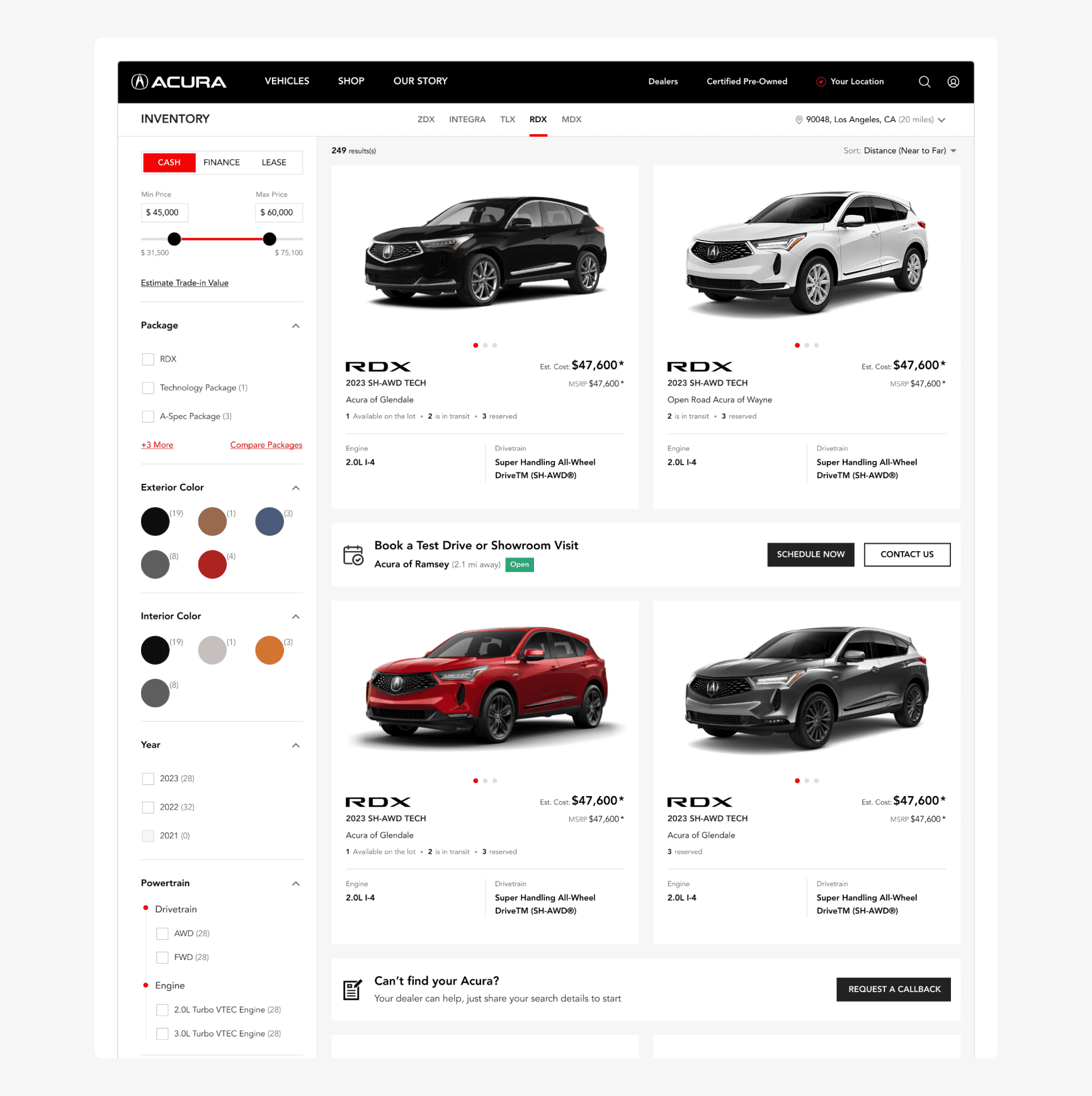
Concept 2: Inline Banners
Improving the design for Inline Banners
We agreed that the inline banner (Concept 2) was a stronger approach than filler cards. It took up less space and blended naturally into the vehicle grid.
The next step was solving for its limitations and refining the design.
Solving for Visual Overlap Risk
In early iterations, the banners blended too much with the VSR cards. To fix this, we explored multiple variations in layout and contrast. The final version followed Acura’s visual language. Premium and distinct enough to draw attention without stealing focus from the vehicles.
Solving for Visual Noice
We decided not to display both banners together. Instead, we alternated them at regular intervals:
Book a Test Drive banner appeared after every 3rd row.
Request a Callback banner appeared after every 6th row.
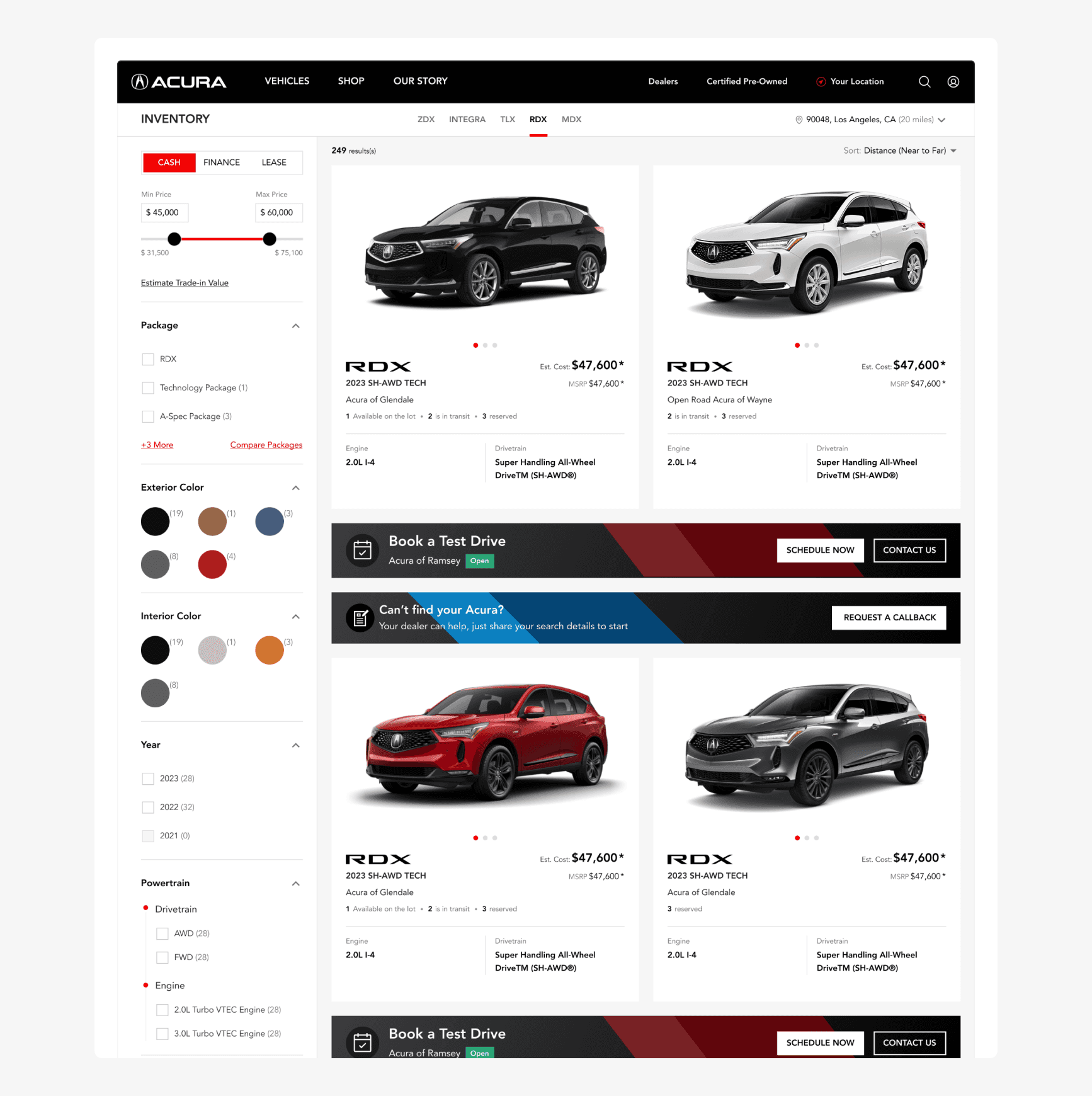
Improving the design for Inline Banners
The Solution
This approach struck the right balance
the inline banners felt integrated
they guided users toward key actions at the right moments
and satisfied the stakeholders’ need for visibility without compromising the browsing flow.
Our original goal was to make key actions more visible & accessible earlier in the journey. And that’s exactly what we achieved.
After introducing targeted lead-generation banners on the VSR page, overall monthly website lead conversions increased by 5.2% (without any major rise in traffic).
The goal was to make key actions more visible and accessible earlier in the journey.
The Impact
Overall monthly website lead conversions increased by 5.2% in April (without any major rise in traffic)
In the coming months, we were able to capture those “warm” leads that previously dropped off mid-journey.
Continued month-on-month improvement after launch
What mattered more in this case was the trend. Leads volume kept improving over the next few months. Banner-driven leads steadily grew and eventually performed on par with the existing CTAs on the details page.
Adopted across Tekion’s Digital Retail B2B product
Standardised this as a component and integrated it inside Tekion’s Digital Retail product. OEMs like General Motors, Chevy, Cadillac, Buick and others adopted the same banner pattern in their buying journeys. And the response has been consistently positive, which validated that the solution solved a true behaviour gap across automotive brands, not just Acura.
Want to See More?
Thanks for reading!
Let’s connect and I’ll walk you through the design decisions and my thought process in detail. 🤝